
Thesaurus Tool with Right-Click Synonyms
Overview
The Synonym 4 Right Click extension is designed to streamline the writing process by offering immediate access to synonyms directly from the right-click menu. Its primary purpose is to eliminate the need for external tools or complex workflows when seeking alternative word choices. This utility is especially beneficial for content creators, students, and professionals who rely on precise and varied language in their daily tasks.
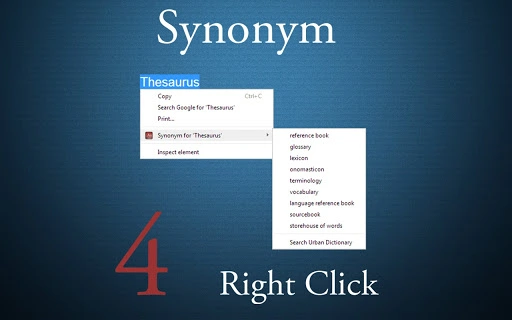
By integrating seamlessly into web browsers, it enables users to highlight any word and instantly retrieve its synonyms without leaving the current page. The tool also supports lookup functionality for urban slang via Urban Dictionary, broadening its utility beyond formal writing. This dual-purpose functionality makes it suitable for both academic and casual content creation.
Target users include writers, editors, and anyone seeking a clutter-free writing assistant. The developer did not provide additional background information. Real-world usage scenarios include editing blog posts, drafting emails, or enhancing essays with more expressive vocabulary. The extension operates entirely within the browser environment, ensuring no system-level changes are required.
Key Features & Capabilities
- Right-Click Synonym Access – Highlight any word on a webpage and access its synonyms with a single right-click, mimicking the familiar behavior of Microsoft Office.
- Urban Dictionary Integration – Offers a secondary lookup option for slang or informal definitions, expanding the tool’s relevance in modern communication.
- Zero Intrusion Design – No ads, no extra buttons, and no cluttered interface. The extension remains unobtrusive and functional only when needed.
- Bug Fixes in Latest Version – The current release includes fixes for all reported issues, improving reliability and user experience.
- Lightweight Installation – At just 1.5 MB, the extension imposes minimal storage impact and loads quickly.
These features are ideal for users who value efficiency and simplicity. For example, a student writing a research paper can quickly replace repetitive terms without switching applications. A content marketer can enhance blog readability by finding more engaging alternatives in real time. The absence of an option menu ensures that the workflow remains intuitive and distraction-free.
User Interface, Workflow & Performance
The user interface is minimal and context-driven. The extension activates only when a word is highlighted, triggering the right-click menu with a Synonym option. Navigation is straightforward—no additional steps are required beyond selecting text and clicking.
Workflow efficiency is high, as the tool eliminates the need to copy-paste text into external thesaurus services. The process is immediate and localized to the current browser tab. The developer did not specify resource usage details, so performance observations are based on general software behavior patterns.
Stability appears to be improved in version 1.0.2, which includes fixes for previously reported bugs. The extension does not require background processes or constant updates, contributing to consistent operation. CPU and RAM usage are expected to remain low due to its lightweight nature, though exact figures were not provided.
Compatibility & System Requirements
Synonym 4 Right Click is compatible with both Windows and Mac operating systems. It is designed for use within Google Chrome, though specific version requirements were not listed. The installation size is 1.5 MB, indicating a compact footprint suitable for devices with limited storage.
Exact system requirements were not listed. Compatibility information was partially provided. The extension does not appear to require elevated permissions or specific hardware configurations, as it functions entirely within the browser environment. Users are advised to ensure their browser is up to date for optimal performance.
Pros and Cons
Pros
- Simple, intuitive right-click access to synonyms
- Integrated Urban Dictionary lookup for slang terms
- Free to use with no ads or tracking
- Lightweight at only 1.5 MB
- Regular updates with bug fixes included
Cons
- No official developer information available
- Limited to Google Chrome browser
- Functionality restricted to highlighted text only
- Does not support offline mode
- No customization options or settings menu
FAQ Section
Is Synonym 4 Right Click available for browsers other than Chrome?
The extension is currently designed for Google Chrome. No information was provided about compatibility with other browsers.
Is the extension safe to use?
Yes, the tool is described as free from ads and tracking. It operates within the browser sandbox, minimizing potential security risks.
How often are updates released?
Updates are issued as needed, with the latest version (1.0.2) including fixes for reported bugs. The frequency of future updates was not specified.
Does the extension require an internet connection?
Yes, since it relies on online services for synonym and Urban Dictionary lookups, an active internet connection is required.
Can I use this tool offline?
No, the extension requires an internet connection to function. It does not support offline synonym lookup.
Final Thoughts + CTA
Synonym 4 Right Click delivers a focused, efficient solution for users seeking quick access to word alternatives without clutter or distractions. Its minimalist design, combined with reliable functionality and regular bug fixes, makes it a strong choice for writers and professionals who value speed and simplicity. While it lacks customization and offline use, its core purpose is executed flawlessly.
For those who frequently edit text online and want a seamless, ad-free experience, this tool offers real value. The absence of unnecessary features ensures it remains lightweight and fast. It is particularly well-suited for students, content creators, and remote workers using Chrome.
Download Synonym 4 Right Click now







